ML-Agents in Unity Definitive Guide: Basic Concepts
Integrating AI into games can feel like magic, but with Unity’s ML-Agents toolkit, it’s a structured, scientific process. This guide breaks down the essential architecture and concepts that turn a static game object into a learning, evolving entity.
Core ML-Agents Unity Concepts
To understand ML-Agents, you must first understand the three-part hierarchy that exists within the Unity Editor:
- The Agent: This is the “brain-dead” actor. It is the script attached to your GameObject (like a car or a predator) that collects information and executes movements.
- The Academy: Think of this as the “simulation manager.” It orchestrates the environment, handles the global settings for the training session, and ensures that the Unity simulation stays in sync with the Python training process.
- The Brain (Policy): In older versions, this was a separate object; now, it is encapsulated in the Behavior Parameters. It is the decision-making logic. When you are training, the “Brain” is external (Python); when you finish, the “Brain” is an embedded
.onnxfile.
Neural Networks Powered ML-Agents Technology
At its heart, ML-Agents is a bridge between Unity (C#) and Python (PyTorch).
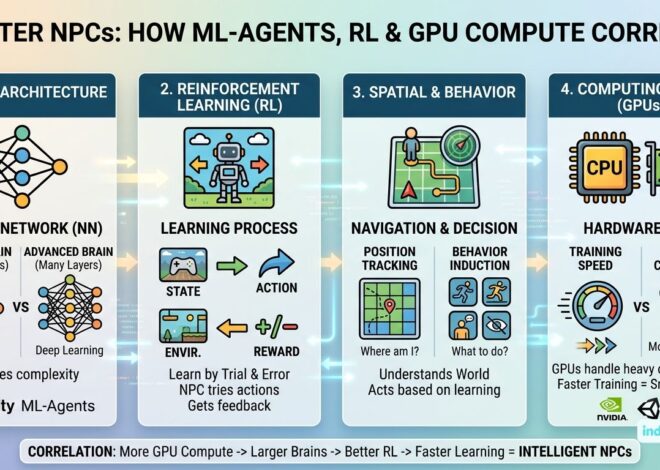
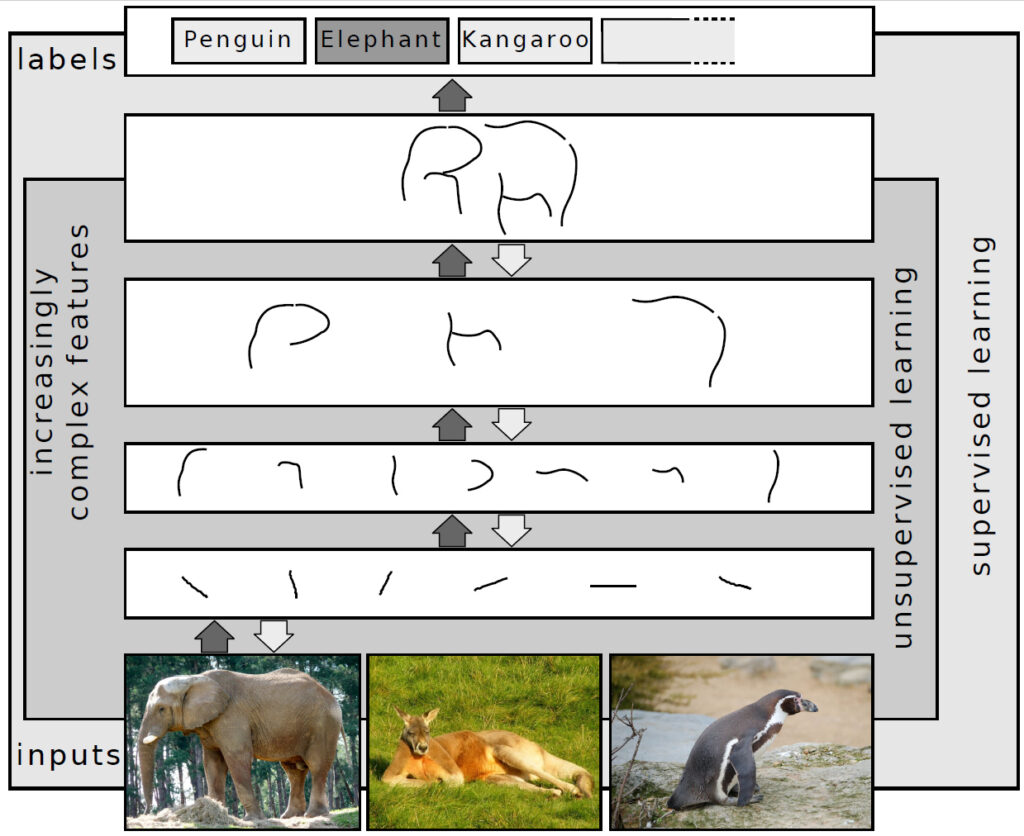
While Unity handles the physics, rendering, and game logic, the actual “thinking” happens via Neural Networks. These are mathematical models inspired by the human brain, consisting of layers of “neurons” that process inputs to produce an output.
In Unity, the Neural Network acts as a complex function:
- Input: What the agent sees (e.g., “The wall is 2 meters away”).
- Processing: The Neural Network calculates probabilities.
- Output: What the agent does (e.g., “Turn left with 80% confidence”).
Neural Network Architecture for ML-Agents: How Do They Work?
ML-Agents typically use a Deep Reinforcement Learning architecture. Here is the step-by-step flow of how the technology operates during a single “step”:
- Observation: The Agent gathers data via
CollectObservations. This could be its own position, the velocity of an enemy, or visual data from a camera. - Vector Encoding: This data is turned into a list of numbers (a vector) and sent to the Neural Network.
- Inference: The Neural Network processes the vector through several “hidden layers.” These layers are where the AI identifies patterns—for example, recognizing that a high velocity toward a wall usually leads to a penalty.
- Action: The network sends back an “Action” (a number), which Unity converts into movement or game logic via
OnActionReceived.
How Do Unity ML-Agents Learn?
Agents don’t “know” how to play your game at the start; they learn through Trial and Error. This process is managed by an optimization algorithm—most commonly PPO (Proximal Policy Optimization) or SAC (Soft Actor-Critic).
The learning process follows this cycle:
- Exploration: Early on, the agent moves randomly to see what happens.
- Experience Buffer: The agent stores thousands of these random interactions.
- Optimization: The Python trainer looks at the buffer. It identifies which actions led to high rewards and updates the Neural Network to make those actions more likely in the future.
- Exploitation: As training progresses, the agent stops “guessing” and begins “exploiting” the patterns it has learned to maximize its score.
What is Reinforcement Learning, and How Does It Work in Unity?
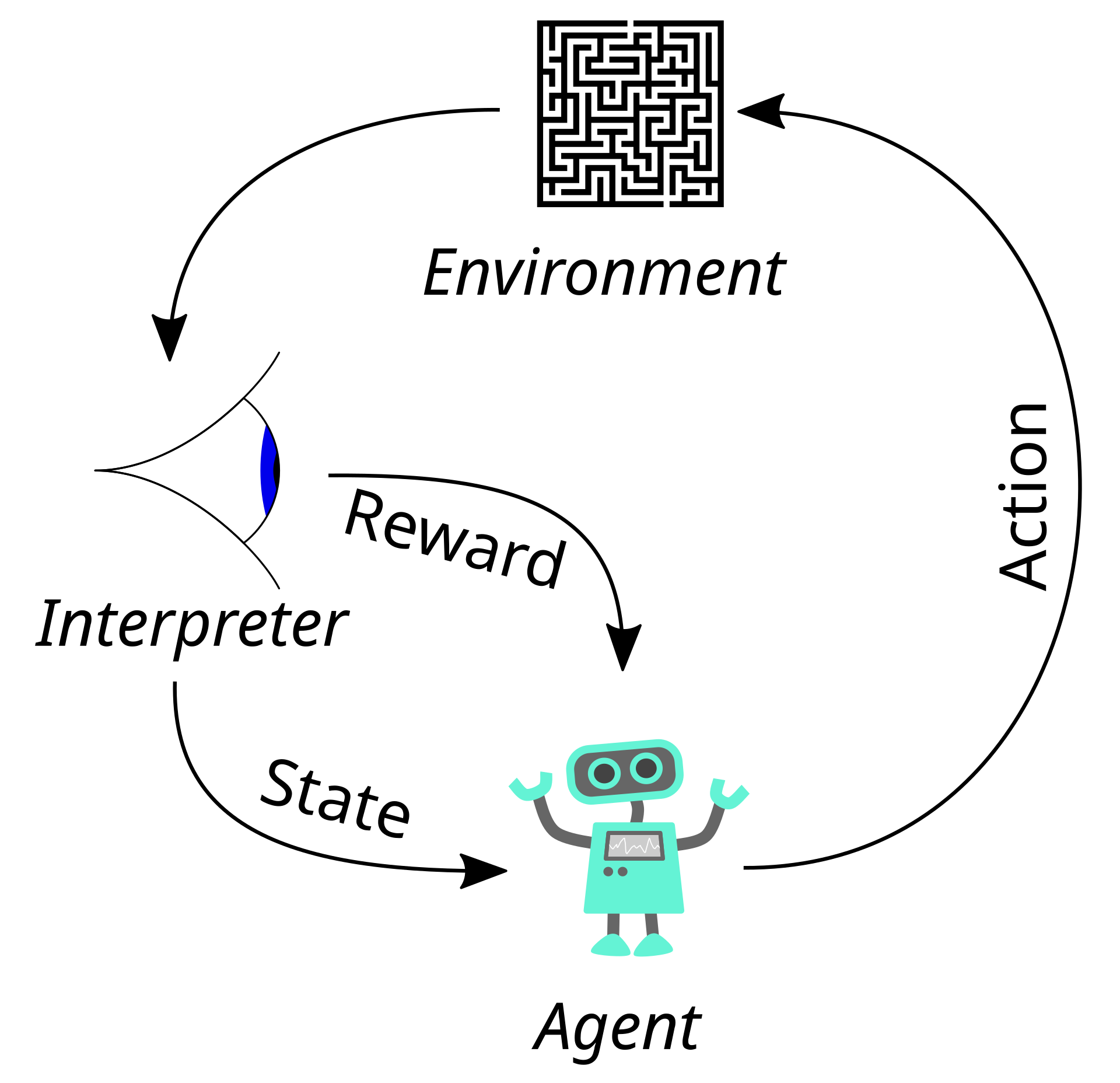
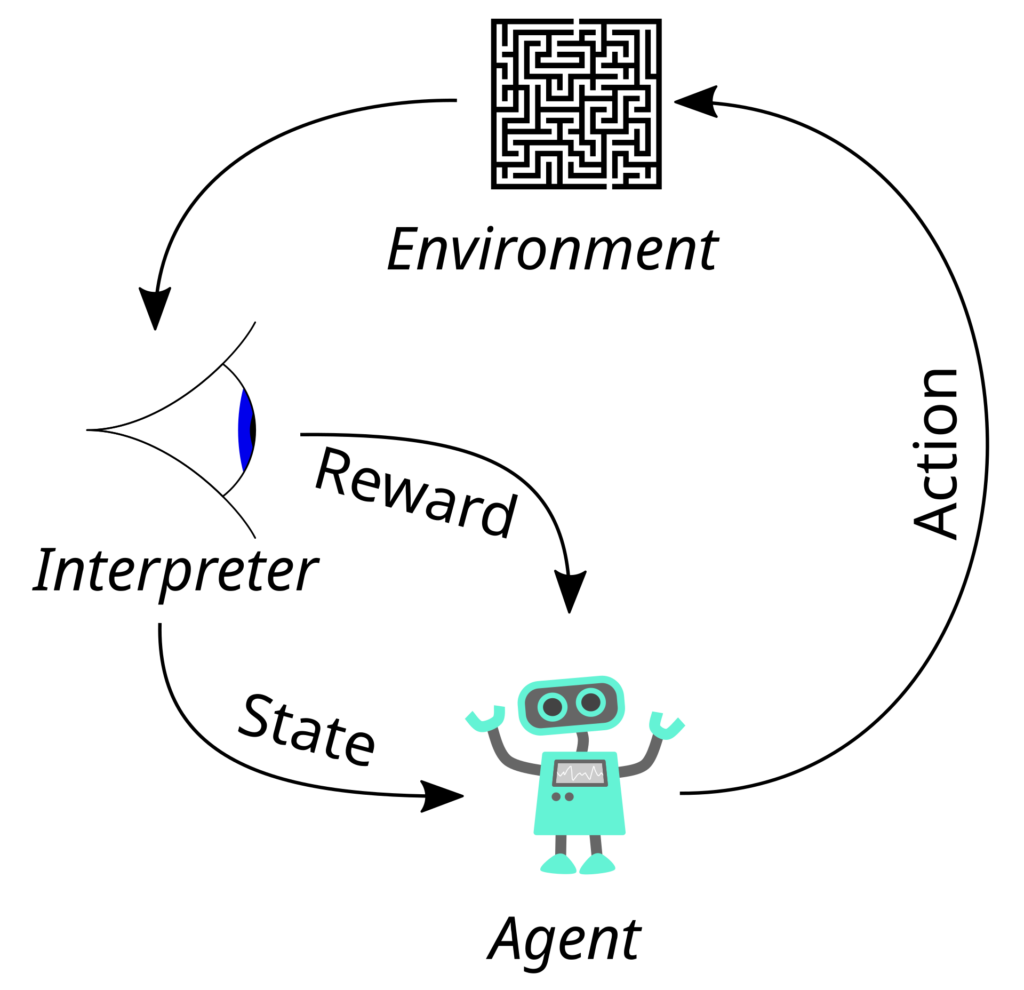
Reinforcement Learning (RL) is a machine learning paradigm where an agent learns to make decisions by performing actions in an environment to achieve a goal.
The Reward Signal
In RL, the most important concept is the Reward. In Unity, you use AddReward(float value) to guide the agent.
- Positive Reward (+1.0): Given when the agent reaches a goal (e.g., catching a deer).
- Negative Reward (-1.0): Given for mistakes (e.g., hitting a tree).
The Goal of the Agent
In Unity ML-Agents, the agent’s sole purpose is to maximize its cumulative reward. If you give a small negative reward for every second that passes (-0.01), you are teaching the agent to solve the puzzle as quickly as possible. If you give a reward for staying alive, you are teaching it survival.
By defining clear observations and a solid reward structure, you can use Reinforcement Learning to create NPCs that are more lifelike and unpredictable than any hand-coded Finite State Machine.
Core ML-Agents Unity Concepts
To understand ML-Agents, you must first understand the hierarchy that exists within the Unity Editor:
- The Agent: The “actor” script attached to your GameObject (e.g., a wolf or a car).
- The Academy: The manager that orchestrates the simulation, synchronizing the Unity engine with the Python training process.
- Behavior Parameters: The component where you define the “Brain” of the agent, including its observation size and action types (Discrete or Continuous).
i) Wiring and Connecting: The C# Integration
To connect your Unity objects to the AI logic, you must inherit from the Agent class using the Unity.MLAgents namespace. The “wiring” happens in five key methods:
Initialize(): Used likeAwake()orStart()to cache references.OnEpisodeBegin(): Resets the environment (e.g., teleports the agent and target to random spots) when a goal is reached or a failure occurs.CollectObservations(VectorSensor sensor): This is where you tell the agent what it “sees.” You add data like positions or distances usingsensor.AddObservation().OnActionReceived(ActionBuffers actions): The neural network sends numbers here. You convert these numbers into movement (e.g.,transform.Translate).Heuristic(in ActionBuffers actionsOut): Essential for testing. This allows you to map keyboard inputs (WASD) to the agent’s actions to see if the physics work before training.
Neural Networks & Architecture: How It Works
Unity ML-Agents uses Neural Networks—mathematical models inspired by the brain—to process information.
- Technology: It bridges Unity (C#) for physics and Python (PyTorch) for the “thinking.”
- Flow: The Agent gathers data → turns it into a Vector (list of numbers) → sends it to the Neural Network → receives an Action.
- Architecture Types:
- Simple Encoder: For basic vector data.
- CNN (Convolutional Neural Network): For visual/camera input.
- Recurrent (LSTM): For agents that need “memory” of past events.
How They Learn: Reinforcement Learning
Agents learn through Trial and Error. This is called Reinforcement Learning (RL).
- Rewards: You use
AddReward(float)to guide them. A +1.0 for reaching a goal, and -1.0 for hitting an obstacle. - The Goal: The agent’s only purpose is to maximize its cumulative reward.
- Optimization: Algorithms like PPO (Proximal Policy Optimization) or SAC (Soft Actor-Critic) look at millions of “steps” and update the neural network to make successful actions more likely.
Top Use Cases of ML-Agents
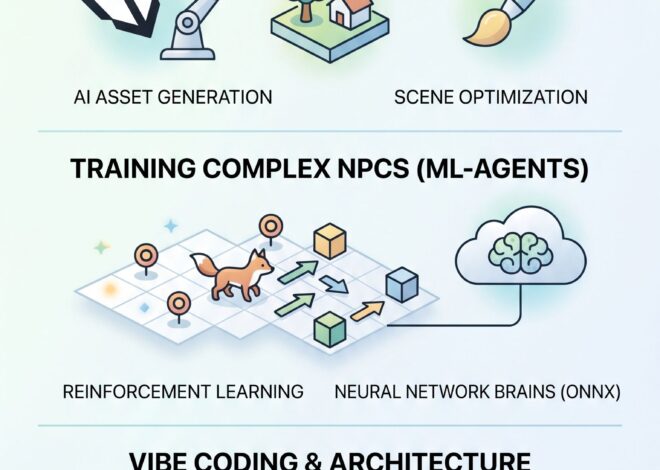
- Complex NPC AI: Creating wildlife or enemies that adapt to player tactics.
- Automated Game Testing: Training an agent to “break” your level to find bugs or unreachable areas.
- Game Balancing: Using AI to play thousands of matches to see if one character or weapon is overpowered.
- Industrial Simulation: Creating “Digital Twins” for autonomous robots or factory floor planning.
GPU Requirements & Complexity
The hardware you need depends entirely on the Observations and Architecture:
| Complexity | AI Type | Recommended GPU | VRAM |
| Basic | Simple movement, Vector obs (numbers). | GTX 1650 / RTX 3050 | 4GB |
| Medium | Raycasts, multiple agents, complex rewards. | RTX 3060 / RTX 4060 | 8GB |
| High | Visual/Camera input, CNNs, LSTMs (Memory). | RTX 3080 / RTX 4080+ | 12GB+ |
Note: For Inference (running the AI in your game), Unity uses the Sentis engine, which is highly optimized and can even run on mobile CPUs. High-end GPUs are primarily for the Training phase.
Top Free Sources to Learn
- Official Unity ML-Agents Docs: Unity ML-Agents Manual
- Unity Learn: The Hummingbirds Course is the gold standard for beginners.
- Code Monkey (YouTube): Offers fantastic “Kitchen Chaos” style breakdowns for AI integration.
- GitHub Examples: Check the
Project/Assets/ML-Agents/Examplesfolder in the official repo.
Python & PyTorch: What You Actually Need
You don’t need to be a Python expert, but you should understand these concepts:
ONNX: Knowing how to export the trained model from Python into a .onnx file to drag back into Unity.
Python Basics: Installing packages via pip, managing Virtual Environments (venv or conda), and editing .yaml configuration files.
PyTorch: You don’t need to write PyTorch code from scratch, but understanding Tensors (how data is packaged) and Hyperparameters (Learning Rate, Batch Size, Beta) is crucial for tweaking your agent’s performance.